
.png)
Description
Download AI Marketing by Martekings – AI Branding, Free Design Tool, Secure & Easy
Overview
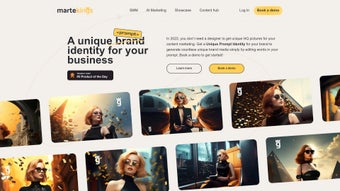
AI Marketing by Martekings is a cloud‑based AI‑driven branding platform that lets businesses generate unique visual identities without a single line of code or graphic‑design expertise. The tool focuses on transforming simple text prompts into high‑resolution brand assets—logos, social‑media graphics, ad banners, and more—through an intuitive, drag‑and‑drop interface. By allowing users to edit keywords inside prompts, the engine produces countless variations, giving marketers the freedom to experiment until they find the perfect look for a campaign. Martekings positions the solution as a “no‑designer‑required” workflow enhancer, promising faster turnaround times, consistent brand language, and a noticeable reduction in outsourcing costs. While the platform does not yet expose an API or deep‑dive analytics, its core value lies in the seamless blend of AI creativity and a user‑centric UI that speeds up the creation of polished media. Whether you are a startup seeking a quick brand lift or an established company aiming to refresh visual assets across multiple channels, AI Marketing by Martekings provides a secure, browser‑based environment that stores all generated files in an encrypted cloud vault, ensuring data privacy and easy collaboration among team members.
Key Features & Functionalities
- Prompt‑Based Brand Generation: Type or tweak simple keywords (e.g., “modern, teal, tech”) and watch the AI instantly render multiple logo concepts and supporting graphics.
- Unlimited Variation Engine: The AI recombines styles, colors, and layouts on the fly, delivering virtually infinite design options for each prompt.
- One‑Click Export: Export assets in PNG, SVG, or PDF formats with a single click, ready for web, print, or social media use.
- Brand Asset Library: All generated files are automatically saved to a personal library, searchable by project name, tag, or date.
- Responsive Design Preview: Preview how each graphic looks on desktop, tablet, and mobile screens before finalizing.
- Collaboration Mode: Invite team members to view, comment, or co‑edit prompts in real time, keeping feedback loops tight.
- Secure Cloud Storage: All assets are stored on encrypted servers with two‑factor authentication, guaranteeing data safety.
- Auto‑Update Engine: The AI model receives monthly updates that improve style diversity and resolution quality, ensuring you always have the latest creative capabilities.
Installation & Usage Instructions
Because AI Marketing by Martekings is a SaaS solution, there is no traditional installation process. Users simply need a modern web browser (Chrome, Edge, Safari, or Firefox) and an internet connection. Follow these steps to start creating brand assets:
- Sign Up & Verify: Visit Martekings.com, click “Get Started Free,” and fill out the registration form. A verification email will be sent—click the link to activate your account.
- Choose a Project: After logging in, click “New Project,” give it a name (e.g., “Summer Campaign 2025”), and optionally add tags for future searchability.
- Enter Your Prompt: In the prompt box, type a brief description of the brand identity you want. Use commas to separate adjectives (e.g., “bold, orange, eco‑friendly”). The AI will parse each keyword to influence color palette, typography, and iconography.
- Refine & Iterate: The engine will generate a grid of 8‑12 concepts. Click any thumbnail to enlarge, then use the “Edit Prompt” field to tweak words and instantly regenerate alternatives.
- Download or Share: When satisfied, hit the “Export” button, select your preferred file format, and the asset will download directly to your device. You can also share a secure link with teammates for review.
- Save to Library: All exported files are automatically saved in your personal library. Use the filter bar to locate assets by project, tag, or creation date.
For power users, the platform includes a “Keyboard Shortcut” guide (press “? ” in the dashboard) that speeds up prompt editing, asset preview, and export actions. Since everything runs in the cloud, there are no updates to install—Martekings pushes enhancements behind the scenes, keeping the service current without any user intervention.
Compatibility, Pros & Cons
AI Marketing by Martekings works on any device that supports a modern web browser, making it compatible with Windows 10/11, macOS Monterey and later, Linux distributions, Android 8.0+, and iOS 13+. The responsive UI automatically adjusts to tablet and mobile screens, ensuring a consistent experience whether you are at a desk or on the go.
Pros
- Zero design skill required – perfect for non‑designers.
- Instant, unlimited variations speed up creative brainstorming.
- Secure, encrypted cloud storage protects intellectual property.
- One‑click export in multiple professional formats.
- Collaborative workspace reduces feedback loops.
- Regular AI model updates improve output quality over time.
Cons
- No native desktop app; relies entirely on internet connectivity.
- Limited API access for developers who want deeper integration.
- Advanced branding controls (e.g., custom color codes) are still in beta.
- Free tier imposes a monthly generation cap (50 assets per month).
Frequently Asked Questions
- Q: Is AI Marketing by Martekings really free?
A: The platform offers a generous free tier that lets you create up to 50 branded assets per month. For unlimited generation and premium export options, a paid subscription starting at $19.99/month is available. - Q: Do I need to download any software?
A: No. Everything runs in the browser, so there is nothing to install. Just log in from any supported device. - Q: How secure are my designs?
A: All files are stored on encrypted servers with TLS 1.3 and two‑factor authentication. Martekings complies with GDPR and CCPA standards. - Q: Can I use the generated logos for commercial purposes?
A: Yes. Once you download an asset, you own the full commercial rights, provided you comply with the platform’s licensing terms. - Q: What file formats are supported?
A: PNG, SVG, PDF, and JPG are available for export. Vector formats (SVG) are ideal for scaling without quality loss. - Q: Is there a way to integrate AI Marketing with my existing marketing stack?
A: While an API is not yet public, you can manually download assets and upload them to tools like HubSpot, Mailchimp, or Canva. Future roadmap items include API access.
Conclusion & Call to Action
AI Marketing by Martekings fills a critical gap in the modern marketer’s toolkit: the ability to generate professional‑grade brand assets in minutes without hiring a designer. Its prompt‑driven engine, secure cloud storage, and collaborative features make it an attractive option for startups, agencies, and seasoned marketers alike. While the lack of an API and a few advanced customization options may limit power users, the platform’s ease of use, frequent AI updates, and cross‑device compatibility outweigh those minor drawbacks. If you’re looking to accelerate your branding workflow, reduce costs, and keep your visual assets consistently on‑brand, the free tier is a risk‑free way to test the waters. Download AI Marketing by Martekings today, create your first logo in seconds, and experience the future of AI‑powered design.
Guides & Tutorials for AI Marketing by Martekings
How to install AI Marketing by Martekings
- Click the Preview / Download button above.
- Once redirected, accept the terms and click Install.
- Wait for the AI Marketing by Martekings download to finish on your device.
How to use AI Marketing by Martekings
This software is primarily used for its core features described above. Open the app after installation to explore its capabilities.
User Reviews for AI Marketing by Martekings 0
No reviews found




